
Understand which technologies to choose for websites, business dashboards, mobile apps and desktop tools—and how they can share a Node.js API and MySQL database.
Watch the 11-minute narrated guide, then use the written comparison below. This illustrated guide is based on CodeKits services checked on 6 November 2026. Explains architectural choices and trade-offs; no stack is universally best. Code examples are small learning excerpts, not complete production applications.
Downloads
All excerpts are focused teaching fragments. Use the full source files and README in the starter.
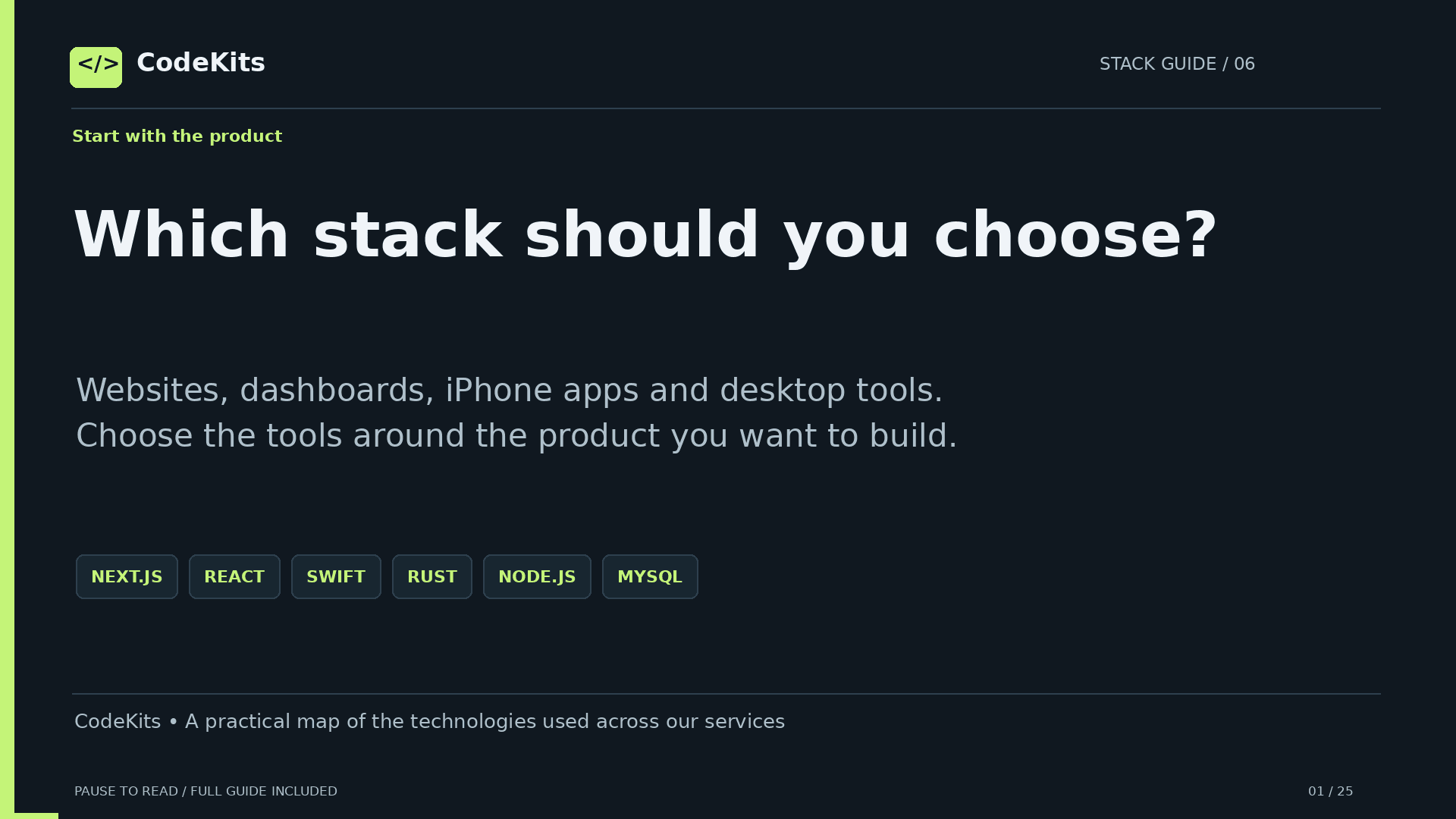
Which stack should you choose?
Websites, dashboards, iPhone apps and desktop tools. Choose the tools around the product you want to build.
CodeKits • A practical map of the technologies used across our services
Ask what the product needs
Audience, devices, data, integrations and team experience matter more than picking a fashionable language.
Who uses it? Customers, staff or developers?
Where? Browser, iPhone, Android or desktop?
What data? Public content or private records?
What integrations? Files, camera, payments or APIs?
What constraints? Time, budget, hosting and maintenance?
Use the simplest architecture that meets the requirements.
Languages are only one layer
Separate programming languages from frameworks, runtimes, databases and development tools.
Languages: JavaScript, TypeScript, Swift, Rust, SQL
UI tools: React, SwiftUI, React Native
App frameworks: Next.js, Tauri
Runtime: Node.js
Database: MySQL
Tools/hosting: Xcode, Ubuntu, Nginx
HTML structures web content; CSS handles presentation. They also matter for web interfaces.
One web language, better tooling
JavaScript runs in browsers and through Node.js. TypeScript adds a type system and compiles to JavaScript.
type Kit = { id: number; title: string };

async function loadKits(): Promise<Kit[]> {
 const response = await fetch("/api/kits");
 if (!response.ok) throw new Error("Request failed");
 const data = await response.json();
 return data.kits;
}
This excerpt needs runtime data validation. TypeScript does not validate a network response by itself.
Build interfaces from components
React is a UI library. Reusable components and state suit interactive dashboards, portals and business apps.
function KitCard({ kit }) {
 return <article>
  <h2>{kit.title}</h2>
  <p>{kit.summary}</p>
 </article>;
}
React does not require Express. You choose routing, server architecture and data access around it.
React plus an integrated framework
Next.js uses React and adds routing, rendering and server features. It is useful for websites and full-stack web apps.
app/page.tsx          → UI route
app/layout.tsx        → shared layout
app/api/kits/route.ts → HTTP endpoint
lib/db.ts             → server-only database code

next build → next start
The browser still runs client-side code. Server components and route handlers execute on the server.
One deployment can serve both sides
On a typical self-hosted setup, one Node process can serve Next.js pages and server routes behind Nginx.
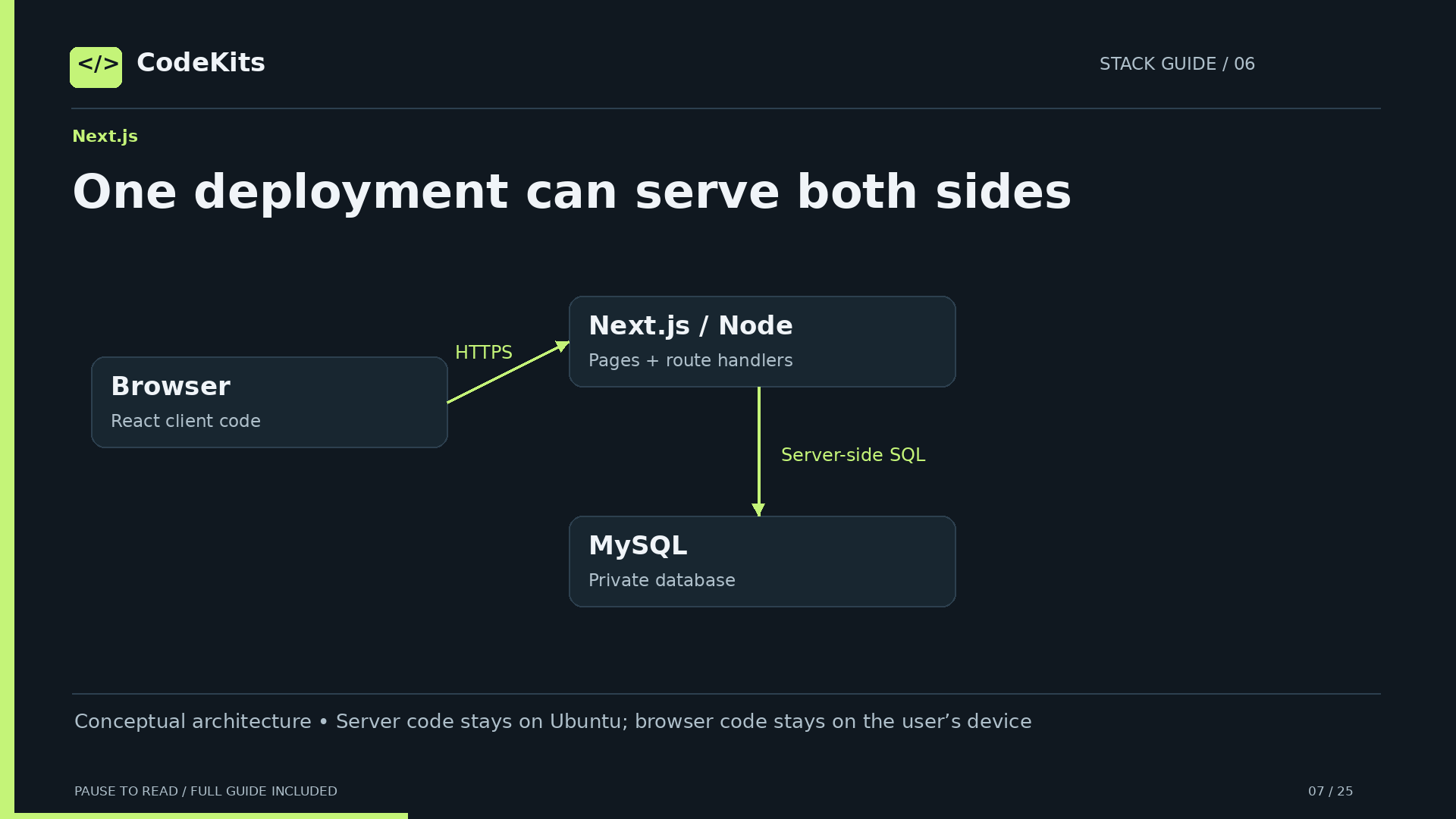
Conceptual architecture • Server code stays on Ubuntu; browser code stays on the user’s device
Reuse Next.js routes too
A Next.js route handler is an HTTP endpoint. Swift and other clients can use it when you design a stable API contract.
export async function GET() {
 const kits = await getKits();
 return Response.json({ kits });
}
A separate backend is not mandatory for mobile reuse. API stability, authentication and scaling guide that choice.
Split the backend when it helps
A separate Node API can serve multiple clients and evolve independently from a web UI.
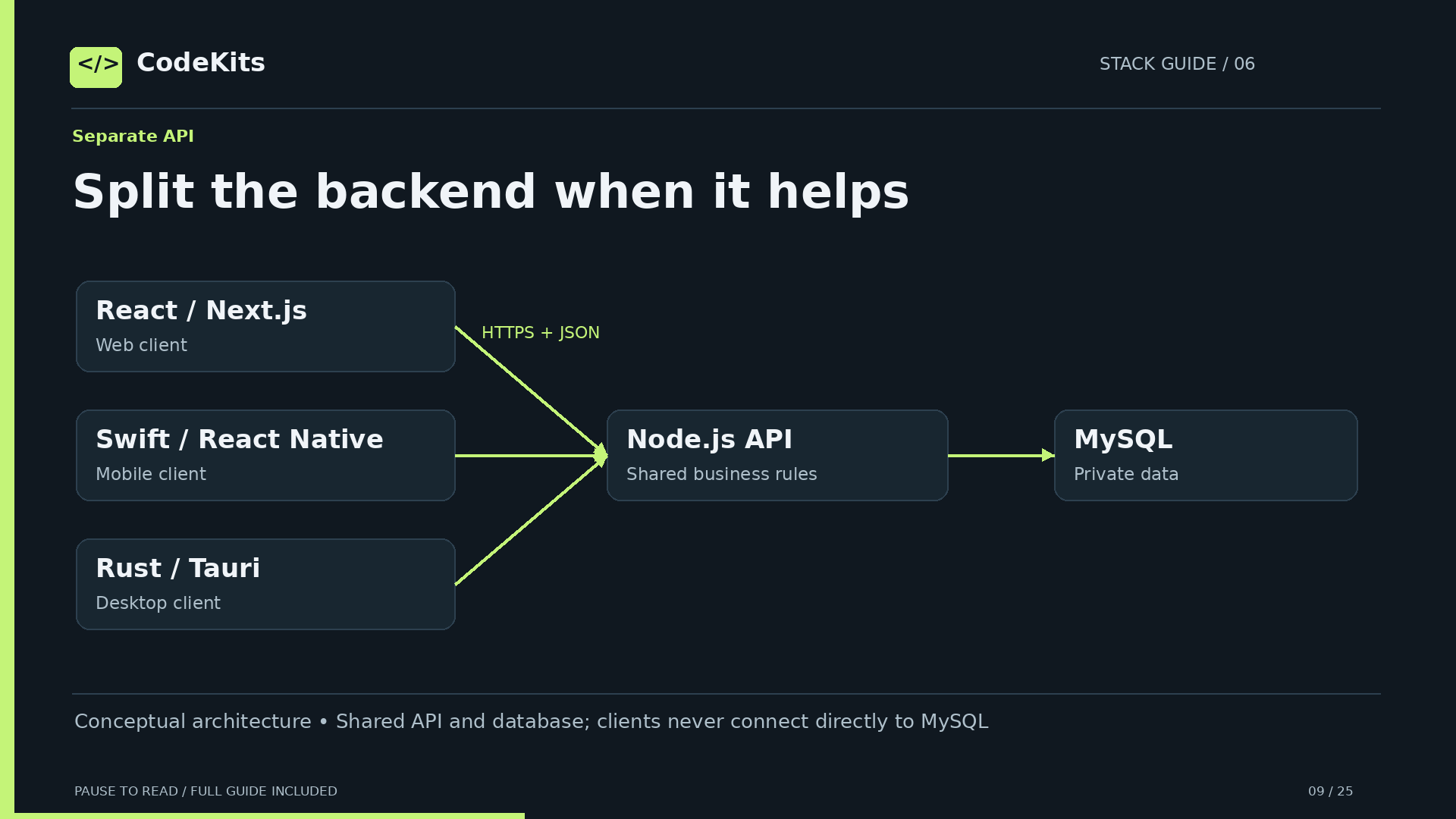
Conceptual architecture • Shared API and database; clients never connect directly to MySQL
Understand the trade-off
Separation gives independent release cycles and a clear service boundary, but adds coordination and operations.
Useful when:
• Web, mobile and desktop share business logic
• Backend changes independently from the website
• You need a durable public API contract

Cost: API versioning, deployment and auth coordination
Separate logical responsibilities do not always require separate machines.
Build native Apple experiences
Swift is the language; SwiftUI describes native interfaces. Xcode builds, previews, debugs and signs Apple apps.
Good fits:
• iPhone and iPad apps
• Apple platform APIs and native UI
• Device features and platform integration

SwiftUI → URLSession → HTTPS API → MySQL
SwiftUI is Apple-platform focused. It is not a cross-platform Android interface framework.
Connect through a contract
The native app sends HTTPS requests and decodes JSON. It should never contain the server’s database password.
struct Kit: Decodable {
 let id: Int
 let title: String
}
// URLSession downloads JSON from your HTTPS API.
// JSONDecoder converts it into your models.
Validate HTTP status, handle loading and errors, and keep UI updates on the main actor.
Share mobile UI concepts
React Native uses JavaScript or TypeScript and React concepts to build mobile apps with native components.
React web: <div> and <button>
React Native: <View>, <Text>, <Pressable>

Shared: product logic, types and API contracts
Platform-specific: permissions, native modules, releases
It is not simply a website inside a WebView. iOS and Android still need platform testing.
Use Rust for native logic
Rust compiles to native code and emphasizes memory safety. It suits system tools, performance-sensitive work and native integrations.
Useful for:
• File and system utilities
• Background processing
• Performance-sensitive algorithms
• Native application logic

Trade-off: ownership and borrowing take time to learn.
Safe Rust prevents many memory errors; unsafe code and application logic still need careful review.
Pair native logic with a web UI
Tauri combines a Rust core with a system webview. React and TypeScript can provide the desktop interface.
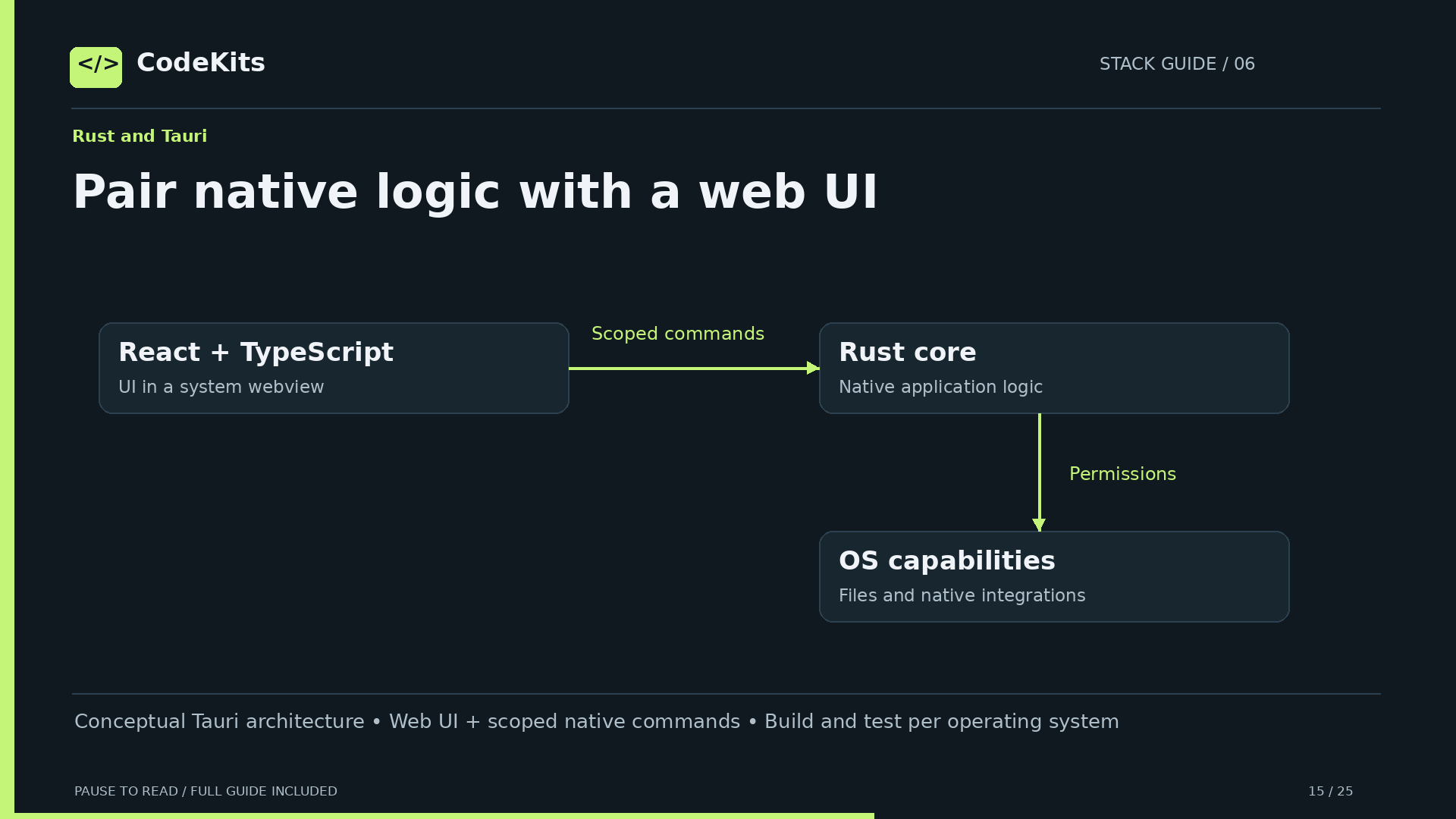
Conceptual Tauri architecture • Web UI + scoped native commands • Build and test per operating system
Cross-platform does not mean zero work
Reuse much of the source across Windows, macOS and Linux, while handling each platform’s build and delivery requirements.
React/TypeScript → Tauri invoke → Rust command

Per-platform work remains:
• Webview and operating-system differences
• Filesystem behavior and permissions
• Packaging, signing and updates
• Testing on each supported platform
Tauri’s web UI is not the same as native SwiftUI widgets. Bundle sizes depend on the application.
Why Node suits your backend
Node uses JavaScript/TypeScript skills on the server and has a broad ecosystem for HTTP APIs and integrations.
Strong fit for:
• I/O-heavy APIs and database-backed services
• Real-time connections
• Webhooks and third-party integrations
• Shared web-team tooling

Await I/O; avoid blocking the event loop.
CPU-heavy work may need worker threads, a job queue or a Rust service. Async does not make heavy computation free.
Why relational data is useful
MySQL fits structured records, relationships and reporting. InnoDB supports transactions and database constraints.
users        → orders        → order_items
projects     → tasks
customers    → support_tickets

Use indexes for important query paths.
Use transactions for changes that must succeed together.
A database choice does not remove the need for schema design, backups, migrations and access control.
Strong choices, not universal winners
Node.js and MySQL are practical for CodeKits’ existing skills and workloads. Different requirements can favor other tools.
PostgreSQL → another strong relational option
SQLite → embedded/local storage and simpler deployments
Rust/Go/etc. → alternative server runtimes and trade-offs
SwiftUI → Apple-native UI
React Native → shared mobile development
Choose with workload, operational needs and team experience—not claims that one stack is always fastest or best.
Agree on HTTP and JSON
Different languages integrate through a stable protocol. They do not need to share a programming language.
GET /api/kits
200 OK
{ "kits": [{ "id": 1, "title": "Starter" }] }

Also define: errors, authentication, pagination, versions
Keep field names and data types consistent.
Share contracts and business rules; validate incoming data and permissions on the server.
Two kinds of integration
Remote services communicate over a network. A desktop UI can also call native code locally through a controlled bridge.
Remote: Swift/React/Rust → HTTPS → Node API
Local:  React webview → Tauri command → Rust

Use narrow capabilities and typed commands.
Do not expose arbitrary shell access to a web UI.
Local IPC and remote API calls have different trust boundaries.
Keep data access on the server
Nginx handles public HTTPS. Node runs as a restricted service. MySQL stays private with a least-privilege account.
Public: HTTPS 443 (HTTP 80 for redirect/certificates)
Private: Node 127.0.0.1:3000
Private: MySQL 127.0.0.1:3306

Secrets: server environment, never client source
Permissions: checked on every protected operation
A login screen or hidden button is not authorization. Client apps are not trusted security boundaries.
Match each service to its job
These are the patterns used across the CodeKits service offering. Start with one product and expand when needed.
Website/store → Next.js + TypeScript + MySQL
Business dashboard → React + Node API + MySQL
iPhone/iPad → SwiftUI + shared API
iOS + Android → React Native + shared API
Desktop utility → Tauri + Rust + React/TypeScript
Next.js can also power dashboards; these are useful patterns, not rigid rules.
Ask ChatGPT to explain the boundaries
AI can help plan, compare, scaffold and debug. Supply constraints and verify its claims against running code and official docs.
Prompt:
"Given these target devices, features and constraints,
compare two suitable architectures. Explain what runs
where, how clients authenticate, where secrets live,
and the maintenance trade-offs. Avoid unnecessary tools."
Review code, test error paths and check licences before adopting generated integrations.
Build the product. Connect the tools.
Choose a focused stack and a clear API contract. Explore web, mobile and desktop development at CodeKits.
codekits.shop/services • Comparison sheets and integration examples included
Official references
- CodeKits services
- CodeKits current service cards
- Next.js self-hosting
- React
- React Native
- SwiftUI
- Tauri architecture
- Node event loop
- MySQL InnoDB
Explore custom apps and websites at CodeKits.
For help choosing and building your application, explore CodeKits development services.